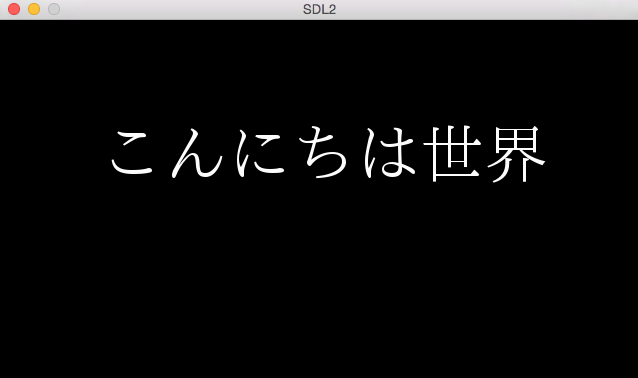
SDL2で文字列を描画します。文字列の描画にはSDL_ttfが必要です。
Table of Contents
1 SDL_ttf
SDL_ttfでTrueTypeフォントファイルを用いて、UTF8とUNICODEの文字列を描画できます。内部ではFreeTypeライブラリを使用しています。
2 TrueTypeフォント
日本語対応のものを用います。条件に従い商用利用・再配布が可能な IPAフォントが有名どころだと思います。その他のフォントを利用する場合はライセンスと使用条件を熟読する必要があります(フリーのフォントでも印刷は許可されても梱包が許されていないものが多い)。
3 TTF_Init
TTF_InitでSDL_ttfを初期化します。このAPIを呼び出すことで他のSDL_ttfのAPIを使用できるようになります。
int TTF_Init()
TTF_InitはSDL_Initよりも前に実行しても問題ありません。
4 TTF_Quit
TTF_QuitでSDL_ttfを終了します。
void TTF_Quit()
5 TTF_GetError
TTF_GetErrorでSDL_ttfのエラー情報を取得できます。
char *TTF_GetError()
6 TTF_Font構造体
TTF_Font構造体はフォントファイルを扱う構造体です。メンバ変数は外部からは隠蔽されています。
/* The internal structure containing font information */
typedef struct _TTF_Font TTF_Font;
プログラム初期化時にTTF_Font構造体を作成したら、プログラム終了時まで使い回すことになると思います。
7 TTF_OpenFont
TTF_OpenFontでフォントファイルを読み込みます。フォントファイルへファイルストリーム経由でアクセスします。TTF_Font構造体は文字列からSDL_Surface構造体を作成するのに必要となります。
TTF_Font *TTF_OpenFont(const char *file, int ptsize)
TTF_OpenFontRWでSDL_RWops構造体からTTF_Font構造体を取得できます。 SDL_RWFromMemを用いてフォントファイルをメモリに展開してからTTF_Font構造体を取得することもできますが、日本語対応のフォントファイルは数MBのオーダになるため、ファイルストリームでアクセスした方が良いかもしれません(TTF_OpenFontRWを用いている間はSDL_RWops構造体は解放できず、メモリに展開したフォントファイルもそのままにしなければならない)。
8 TTF_CloseFont
TTF_CloseFontでTTF_Font構造体を解放します。
void TTF_CloseFont(TTF_Font *font)
9 TTF_RenderUTF8_Blended
SDL_ttfではUTF8とUNICODEの文字列をサポートしています。サンプルプログラムではUTF8を使用します。
TTF_RenderUTF8_BlendedでUTF8の文字列からSDL_Surface構造体を作成します。
SDL_Surface *TTF_RenderUTF8_Blended(TTF_Font *font, const char *text, SDL_Color fg)
UTF8の文字列からSDL_Surface構造体を作成するには、この他にTTF_RenderUTF8_SolidとTTF_RenderUTF8_Shadedがありますが、文字が崩れるのを防ぐ為に、一番綺麗に見える(一番処理時間が掛かる)TTF_RenderUTF8_Blendedを使用しています。
UNICODEの文字列からSDL_Surface構造体を作成するTTF_RenderUNICODE_Blended等があります。
10 サンプルプログラム
SDL2でUTF8の文字列を表示します。フォントファイルはIPAフォントを別途ダウンロードしてお使いください。 SDL2のアルファブレンディングと色調補正のソースコードから次の変更を加えます。
10.1 Fontクラス
TTF_Font構造体をマップとして持つ、Fontクラスを作成します。文字列をレンダリングする際、Fontクラスのグローバルメソッド経由でTTF_Font構造体にアクセスします。
#ifndef __MYSDL_FONT_H
#define __MYSDL_FONT_H

#include <SDL.h>
#include <SDL_ttf.h>
#include <string>
#include <map>
#include <iostream>

namespace mysdl {

enum FontType {
  FONT_TYPE_NORMAL,
  FONT_TYPE_GOTHIC,
};

class Font {
 private:
  static std::map<FontType, Font *> gMap;
  TTF_Font *mFont;

 public:
  Font(const std::string &fontName, size_t fontSize)
  {
    mFont = TTF_OpenFont(fontName.c_str(), fontSize);
  }

  ~Font()
  {
    TTF_CloseFont(mFont);
  }

  static void initialize()
  {
    TTF_Init();
    gMap[FONT_TYPE_NORMAL] = new Font("ipaexm.ttf", 64);
    gMap[FONT_TYPE_GOTHIC] = new Font("ipaexg.ttf", 64);
  }

  static void finalize()
  {
    for (std::map<FontType, Font *>::iterator it = gMap.begin(),
           end = gMap.end(); it != end; ++it)
      delete it->second;
    gMap.clear();
    TTF_Quit();
  }

  static TTF_Font *getFont(FontType type)
  {
    std::map<FontType, Font *>::iterator it = gMap.find(type);
    return it == gMap.end() ? nullptr : it->second->getFont();
  }

  TTF_Font *getFont()
  {
    return mFont;
  }
};

};

#endif /** __MYSDL_FONT_H */
10.2 StringTextureクラス
UTF8の文字列からSDL_Texture構造体を作成します。FontクラスからTTF_Font構造体を取得します。Textureクラスを継承します。
#ifndef __MYSDL_STRING_TEXTURE_H
#define __MYSDL_STRING_TEXTURE_H

#include <Texture.h>
#include <Font.h>
#include <SDL.h>
#include <SDL_ttf.h>
#include <iostream>
#include <string>

namespace mysdl {

class StringTexture : public Texture {
 public:
  StringTexture(const std::string &string, SDL_Color color,
                FontType type)
  {
    SDL_Surface *surface = TTF_RenderUTF8_Blended(Font::getFont(type),
                                                  string.c_str(),
                                                  color);
    setSurface(surface);
  }
};

};

#endif /** __MYSDL_STRING_TEXTURE_H */
10.3 StringObjectクラス
StringTextureをメンバに持つクラスです。Objectクラスを継承し、描画処理をそのまま流用します。
#ifndef __MYSDL_STRING_OBJECT_H
#define __MYSDL_STRING_OBJECT_H

#include <Object.h>
#include <StringTexture.h>
#include <Font.h>
#include <string>

namespace mysdl {

class StringObject : public Object {
 public:
  StringObject(const std::string &string, SDL_Color color,
               FontType type, int x, int y)
    : Object(new StringTexture(string, color, type), x, y, 0, 0)
    {
      SDL_Rect *rect = getTexture()->getRect();
      setRect(x, y, rect->w, rect->h);
    }
};

};

#endif /** __MYSDL_STRING_OBJECT_H */
10.4 main.ccの変更
sキーを押した際に「こんにちは世界」と描画します。「こんにちは世界」はUTF8でエンコーディングされています(SJISやUNICODEなエディタをお使いの際は別ファイルに格納しておいて読み出してください)。
$ diff -uprN src.org/main.cc src/main.cc
--- src.org/main.cc     2015-05-14 03:14:18.000000000 +0900
+++ src/main.cc 2015-05-17 01:19:07.000000000 +0900
@@ -2,6 +2,8 @@
 #include <Renderer.h>
 #include <AlphaAndColorModThread.h>
 #include <SpriteObject.h>
+#include <StringObject.h>
+#include <Font.h>
 #include <SDL.h>

 using namespace mysdl;
@@ -42,6 +44,16 @@ static bool input()
         bmpX += 48;
         break;
       }
+      case SDLK_s: {
+        static int stringX = 100;
+        SDL_Color color = { 254, 254, 254, 254 };
+        StringObject *string
+          = new StringObject("こんにちは世界", color,
+                             FONT_TYPE_NORMAL, stringX, 100);
+        gRenderer->send(string);
+        stringX += 48;
+        break;
+      }
       default:
         break;
       }
@@ -58,12 +70,16 @@ int main(int argc, char *argv[])
 {
   Window window(SDL_WINDOW_TITLE, SDL_WINDOW_WIDTH, SDL_WINDOW_HEIGHT);
   gRenderer = window.getRenderer();
-  AlphaAndColorModThread thread(gRenderer);
+  //AlphaAndColorModThread thread(gRenderer);
+
+  Font::initialize();

   while (1)
     if (input())
       break;

-  thread.stop();
+  Font::finalize();
+
+  //thread.stop();
   return 0;
 }
10.5 実行結果
sキーを押すと以下のように文字列が表示されます。