Ubuntu 16.04でandroidをビルドする手順を記載します。
Table of Contents
1 環境
2016年5月16日現在、Androidのビルドに必要なスペックはRAM 16GBとストレージ150GBです。
以前に比べるとRAMが相当必要になってしまいました。
Yoctoを見習って必要なRAMを減らして欲しいですね。
ここでは以下のスペックでビルドを実行します。
| CPUコア数 | 1 |
| RAM | 4GB |
| スワップ | 16GB |
| ストレージ | 160GB |
2 androidのビルドに必要なパッケージの取得
AndroidのEstablishing a Build Environmentに記載されているUbuntu 14.04のパッケージをインストールします。javaはopenjdk-8-jdkを利用します。
$ sudo apt-get install -y openjdk-8-jdk \
git-core gnupg flex bison gperf build-essential \
zip curl zlib1g-dev gcc-multilib g++-multilib libc6-dev-i386 \
lib32ncurses5-dev x11proto-core-dev libx11-dev lib32z-dev ccache \
libgl1-mesa-dev libxml2-utils xsltproc unzip
3 gitの設定
gitの設定をしていない場合はrepo initで設定する必要があります。
$ git config --global user.name "Your Name"
$ git config --global user.email "[email protected]"
4 repoの取得
repoをダウンロードしてPATHを通します。
$ curl https://storage.googleapis.com/git-repo-downloads/repo > ~/bin/repo
$ chmod a+x ~/bin/repo
$ export PATH=~/bin:${PATH}
5 androidのソースコード取得
repo syncは2時間ほど掛かります。
$ repo init -u https://android.googlesource.com/platform/manifest
$ repo sync -j2
6 classes.dexのOut of Memory対策
classes.dexのコンパイルでOut of Memoryが発生します。 stackoverflowの回答にあるように、jack-serverのjava引数でjavaヒープのサイズを4GBになるようにする必要があります。
ここではJAVA_TOOL_OPTIONSを変更します。
$ export JAVA_TOOL_OPTIONS="-Dfile.encoding=UTF-8 -XX:+TieredCompilation -Xmx4096m"
7 androidのビルド
この環境ではビルドは7時間ほど掛かりました。RAMに余裕があってCPUコアを多数持つ環境ならばjack-serverの設定を変更するか、mに-jオプションを使うことでビルド速度が向上するはずです。
$ . build/envsetup.sh && lunch aosp_x86-eng && m
lunchのリストは引数なしでlunchコマンドを実行することで確認できます。
$ lunch

You're building on Linux

Lunch menu... pick a combo:
     1. aosp_arm-eng
     2. aosp_arm64-eng
     3. aosp_mips-eng
     4. aosp_mips64-eng
     5. aosp_x86-eng
     6. aosp_x86_64-eng
     7. aosp_deb-userdebug
     8. aosp_flo-userdebug
     9. full_fugu-userdebug
     10. aosp_fugu-userdebug
     11. mini_emulator_arm64-userdebug
     12. m_e_arm-userdebug
     13. mini_emulator_mips-userdebug
     14. mini_emulator_x86-userdebug
     15. mini_emulator_x86_64-userdebug
     16. aosp_flounder-userdebug
     17. aosp_angler-userdebug
     18. aosp_bullhead-userdebug
     19. aosp_hammerhead-userdebug
     20. aosp_hammerhead_fp-userdebug
     21. hikey-userdebug
     22. aosp_shamu-userdebug

Which would you like? [aosp_arm-eng]
8 動作確認
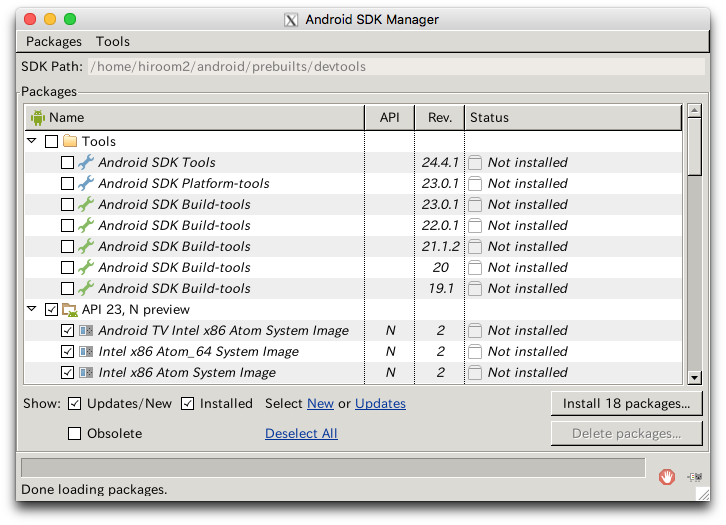
androidコマンドを起動してみます。
$ . build/envsetup.sh && lunch aosp_x86-eng
$ android
androidのSDKマネージャが起動しました。