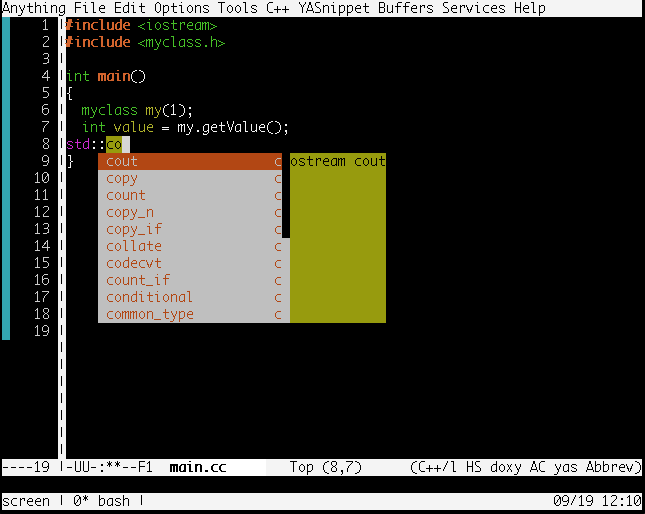
This article will describe using auto-complete-clang-async package which provides C/C++ auto complete.
Table of Contents
1 Install clang-complete and auto-complete-clang.el
Install packages for building clang-complete. And build clang-complete.
This article will load .elisp directory as emacs lisp directory in ${HOME}/.emacs with as below. Please change your emacs lisp directory.
;; emacs lisp directory path
(setq load-path
      (append
       (list
        (expand-file-name "~/.elisp/")
        )
       load-path))
1.1 Ubuntu 16.04
Install llvm-dev and libclang-dev.
$ sudo apt-get install -y clang llvm-dev libclang-dev
$ git clone https://github.com/Golevka/emacs-clang-complete-async
$ cd emacs-clang-complete-async
$ make
$ cp clang-complete ~/bin/
$ cp auto-complete-clang.el ~/.elisp/
1.2 CentOS 7
Install llvm-devel, clang-devel and zlib.
$ sudo yum install -y llvm-devel clang-devel zlib
$ git clone https://github.com/Golevka/emacs-clang-complete-async
$ cd emacs-clang-complete-async
$ make
$ cp clang-complete ~/bin/
$ cp auto-complete-clang.el ~/.elisp/
1.3 OSX
Because XCode does not have enought Clang header files, install clang and llvm with Homebrew.
$ brew install --with-clang --all-targets --rtti --universal --jit llvm
$ git clone https://github.com/Golevka/emacs-clang-complete-async
$ cd emacs-clang-complete-async
$ make LLVM_CONFIG=/usr/local/opt/llvm/bin/llvm-config CC=/usr/local/opt/llvm/bin/clang
$ cp clang-complete ~/bin/
$ cp auto-complete-clang.el ~/.elisp/
2 ${HOME}/.emacs
Load auto-complete-clang-async and add to c++mode-hook in ${HOME}/.emacs.
(require 'auto-complete-clang-async)
(add-hook 'c++-mode-hook
          '(lambda()
             (setq ac-clang-complete-executable "~/bin/clang-complete")
             (setq ac-sources '(ac-source-clang-async))
             (ac-clang-launch-completion-process)))
This settings provides auto complete of standard include headers.
3 Original include headers
Auto complete of original include headers needs setting ac-clang-cflags or calling ac-clang-set-cflagas.
3.1 Set ac-clang-cflags in ${HOME}/.emacs
Setting ac-clang-cflags in ${HOME}/.emacs.
(custom-set-variables
 '(ac-clang-cflags '("-I/path/to/include"))
)
3.2 Call ac-clang-set-cflags in M-x
Call ac-clang-set-cflags in M-x.
M-x ac-clang-set-cflags
New cflags: -I/path/to/include
3.3 Add custom elisp initial file to each source tree (Recommend)
The .dir-locals cannot set ac-clang-cflags properly (.dir-locals cannot change custom-set-variables and ac-clang-cflags is custom-set-variables).
The great answer is in StackExchange.
Adding the following setting to ${HOME}/.emacs which can set original value for source tree if source tree has a .settings.el.
(defun recursive-load-dir-settings (currentfile)
  (let ((lds-dir (locate-dominating-file currentfile ".settings.el")))
  (when lds-dir
      (progn
        (load-file (concat lds-dir ".settings.el"))
        (recursive-load-dir-settings
         (file-truename(concat lds-dir "..")))))))

(defun load-dir-settings()
  (interactive)
  (when buffer-file-name
    (recursive-load-dir-settings buffer-file-name)))

(add-hook 'find-file-hook 'load-dir-settings)
Adding the following .settings.el in source tree. You can multiple original includes to list.
(when (equal major-mode 'c++-mode)
  (setq ac-clang-cflags
        (list (concat "-I" (expand-file-name
                            (concat lds-dir "path/to/include")))))
  (ac-clang-update-cmdlineargs)
  (print ac-clang-cflags)
)
4 Execution result
This article uses the following source tree.
$ tree .
.
|-- include
|   `-- myclass.h
`-- src
    `-- main.cc

2 directories, 2 files
Add .settings.el which adds include directory to ac-clang-cflags.
$ cat .settings.el
(when (equal major-mode 'c++-mode)
  (setq ac-clang-cflags
        (list (concat "-I" (expand-file-name
                            (concat lds-dir "include")))))
  (ac-clang-update-cmdlineargs)
  (print ac-clang-cflags)
)
myclass.h defines myclass which has getValue method.
$ cat include/myclass.h
#ifndef __MYCLASS_H
#define __MYCLASS_H

class myclass {
 private:
  int mValue;

 public:
  myclass(int value) : mValue(value) {}
  int getValue() { return mValue; }
}

#endif /** __MY_CLASS_H */
The myclass can be auto completed.
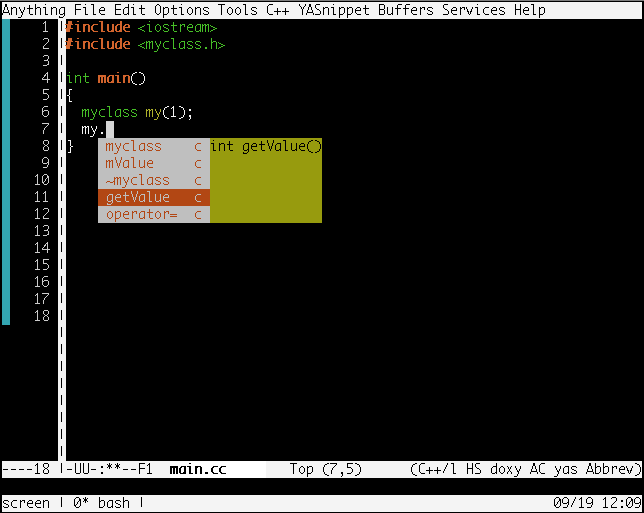
iostream can be auto completed.